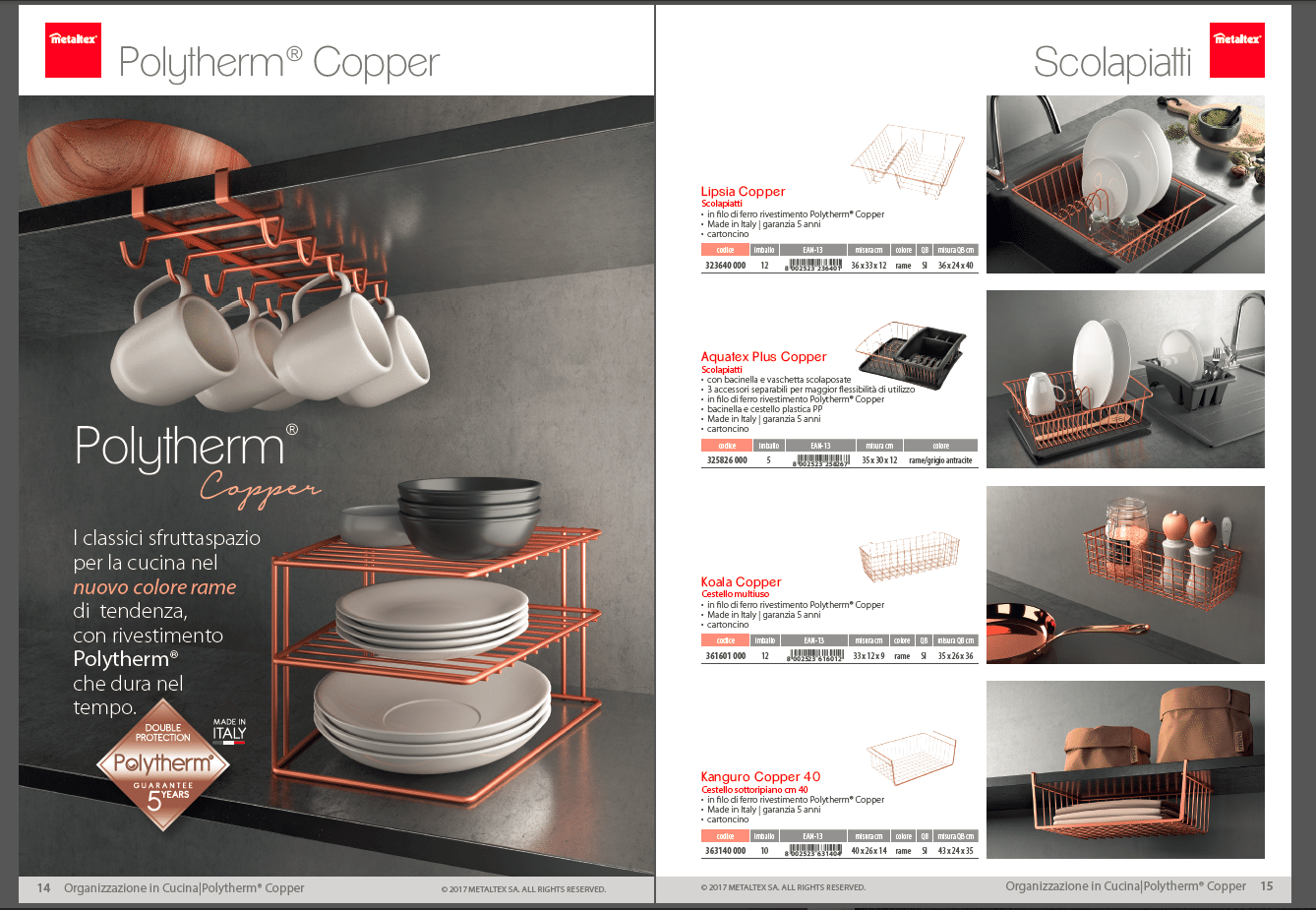
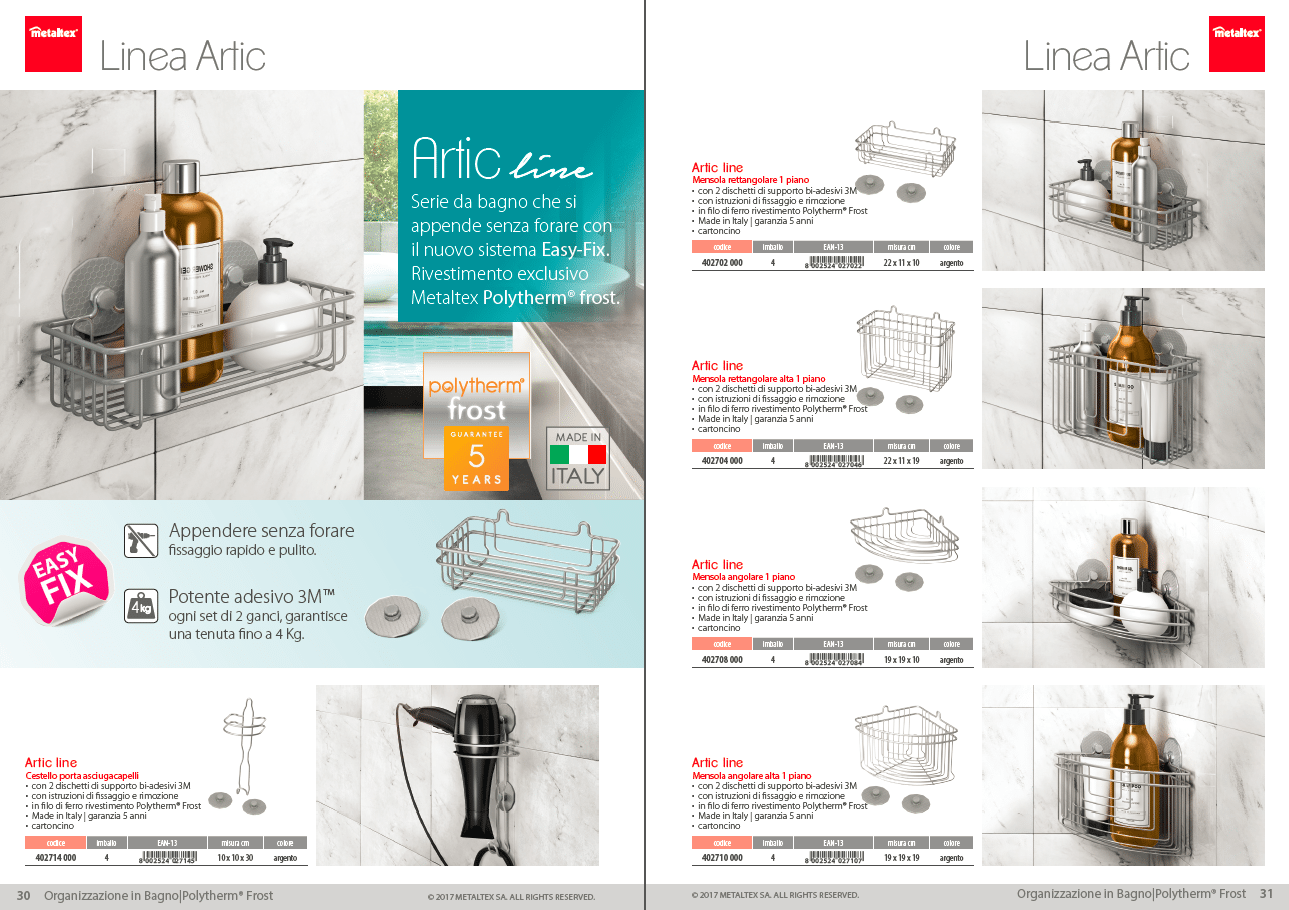
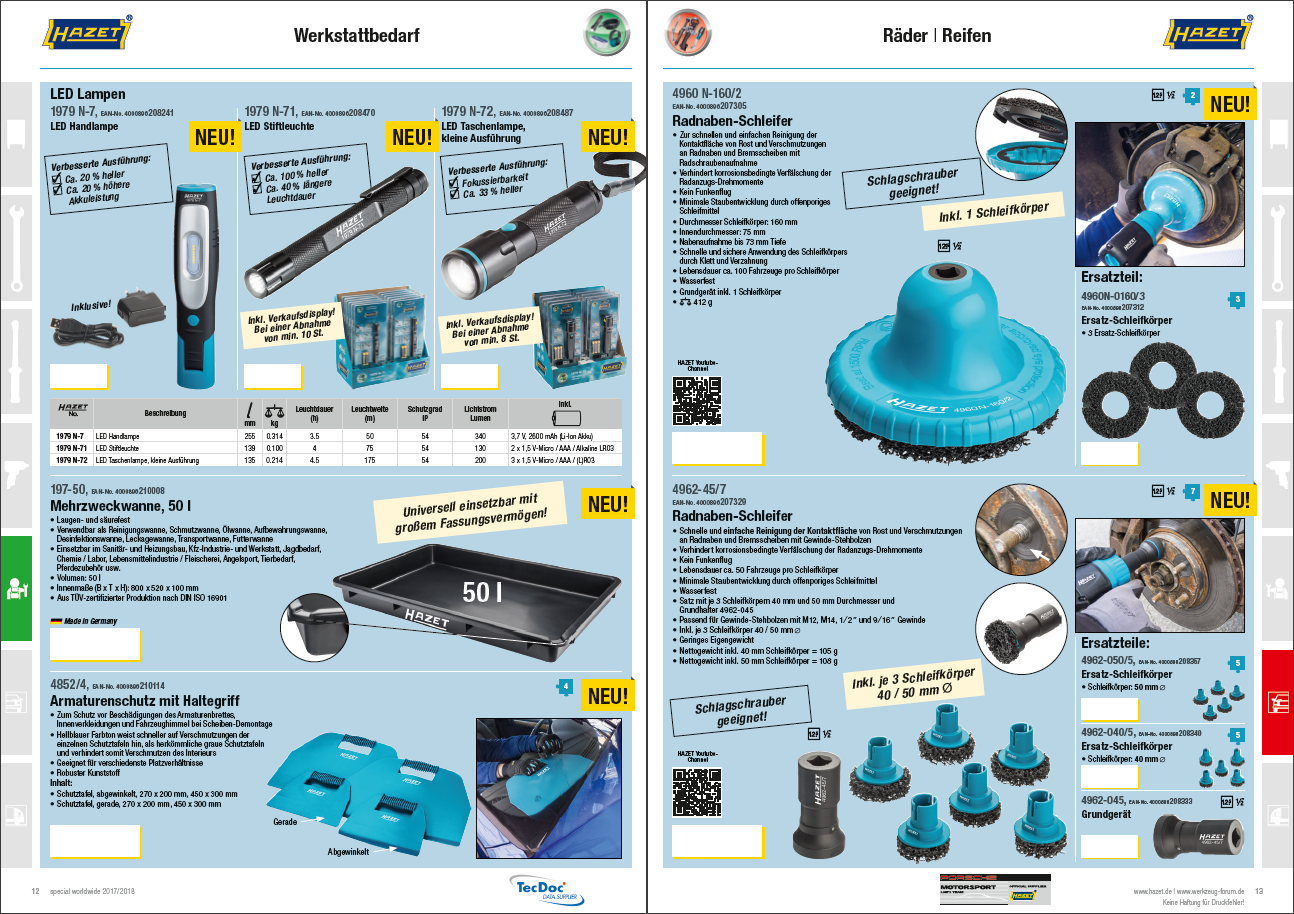
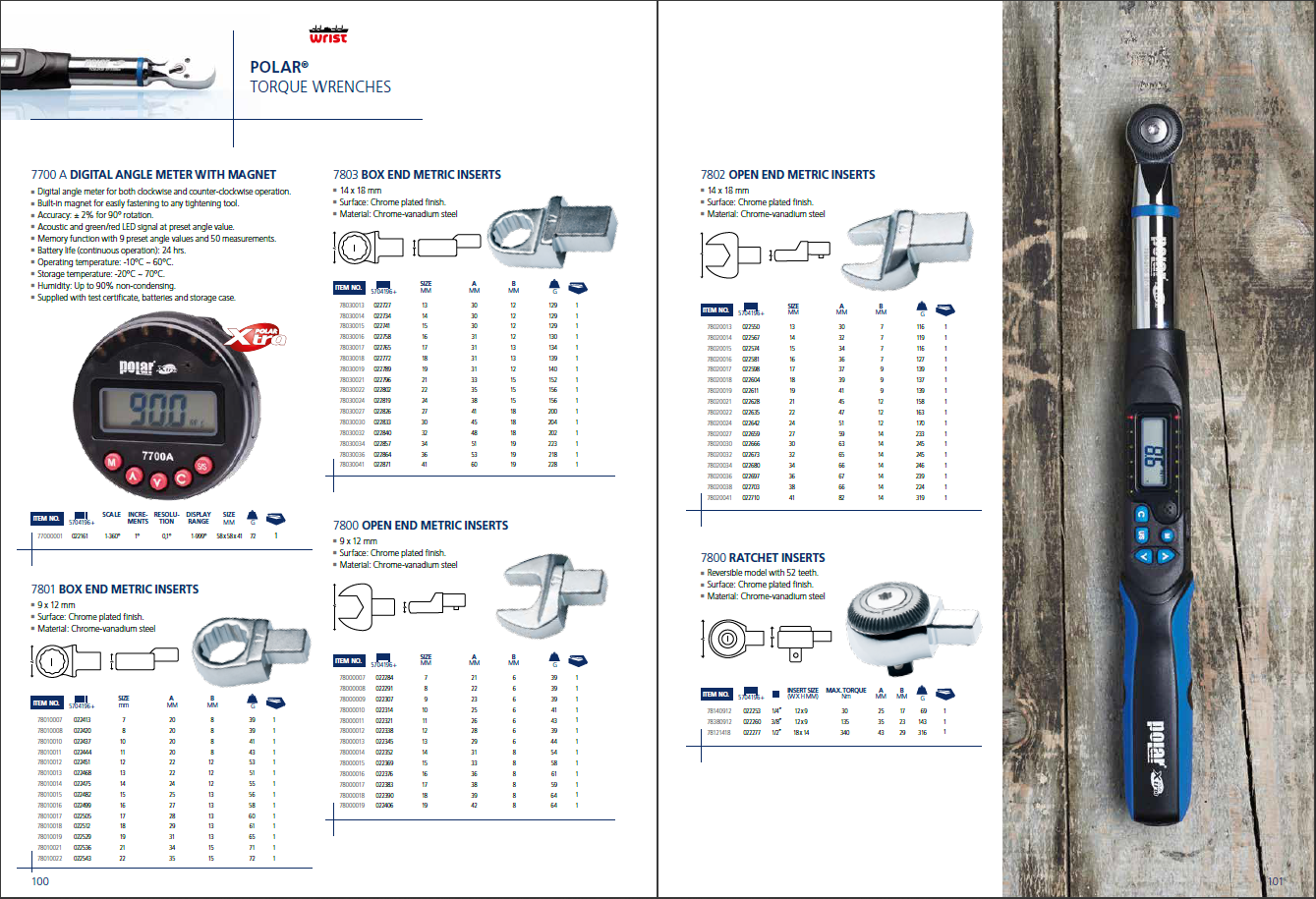
Creating a catalog is one of the most effective ways to showcase your products, tell your brand’s story, and drive sales. Whether you need a printed version, a downloadable PDF, or a digital catalog for your website, the process requires planning, good design, and the right tools.
In this guide, you’ll learn what a catalog is, the essential elements it must include, step-by-step instructions to create your own, the tools you can use, costs to consider, and how catalog automation can make the whole process faster and easier.
A catalog is a structured document that presents a company’s products or services in a clear, organized, and visually appealing way. Depending on your needs, it can take different formats:
Printed: traditional catalogs handed to clients, partners, or sales reps.
PDF: easy to download and share by email.
Digital/Online: interactive versions embedded on websites or e-commerce platforms.
Catalogs remain one of the most effective marketing and sales tools. They give your audience a direct connection to your brand, making it easier to discover products and understand your story. A well-designed catalog doesn’t just inform: it attracts new customers, reinforces loyalty, and strengthens existing relationships.
In any case, catalogs, whether print, PDF, or online, are a powerful way to highlight your offering, guide purchasing decisions, and reinforce brand identity with clarity and impact.
Let’s explore which sections it should contain and how to create one for your business.
Essential parts of a catalog
A successful catalog isn’t just a collection of products. It’s a carefully structured document where every section plays a role in guiding the reader and reinforcing your brand, enhancing the customer experience. Here are the essential elements:
Front Cover
Your front cover is the first impression, and first impressions matter. Choose an eye-catching design that reflects your brand identity and sparks curiosity. You can:
Feature your most popular or newest products.
Pair them with a clear headline and concise, engaging copy.
Highlight seasonal promotions or discounts directly on the cover to drive attention inside.
High-quality photography makes the difference. If you don’t have access to a professional photographer, use natural daylight for bright, attractive results. The goal: get your audience excited to open the catalog and start browsing.
💡In particular, for luxury design brands like Pierre Frey, cover design is crucial to showcase texture, colors, and style. But also to immediately communicate the brand to the customers.
Table of contents
A table of contents isn’t essential, but it makes a catalog much easier to use. It’s not just a convenience for customers, but it’s also a valuable tool for sales reps who need to locate products quickly during calls, meetings, or trade shows.
For larger catalogs, this section acts as a roadmap: it helps readers orient themselves into your products, by understanding immediately how they are grouped and where they are located.
In digital catalogs, a clickable table of contents makes navigation even smoother by linking directly to the right section or product range.
Introduction
Before diving into the product pages, it can be useful to give readers a short introduction. This section sets the mood and helps position your brand in their mind. What you include depends on your goals, but some common options are:
A welcome note that greets readers and makes the catalog feel more personal.
Context about the catalog itself: is it a holiday edition, a clearance sale, or the launch of a new collection?
Brand highlights, such as your values, sustainability efforts, or a quick reminder of what sets you apart.
You can also use this page to point customers toward promotions on your website, or invite them to explore further through clear calls-to-action.
💡For wholesalers like M&P O’Sullivan, the introduction is also an opportunity to share a bit of company history or explain how frequent updates and promotions are managed. This helps strengthen credibility and gives customers a reason to keep coming back.
Content pages
This is the heart of your catalog, where you can showcase your products and convince readers to take action. Every page should be carefully structured to combine clarity with persuasion. Key elements include:
Images: high-resolution, consistent in style, lighting, and background.
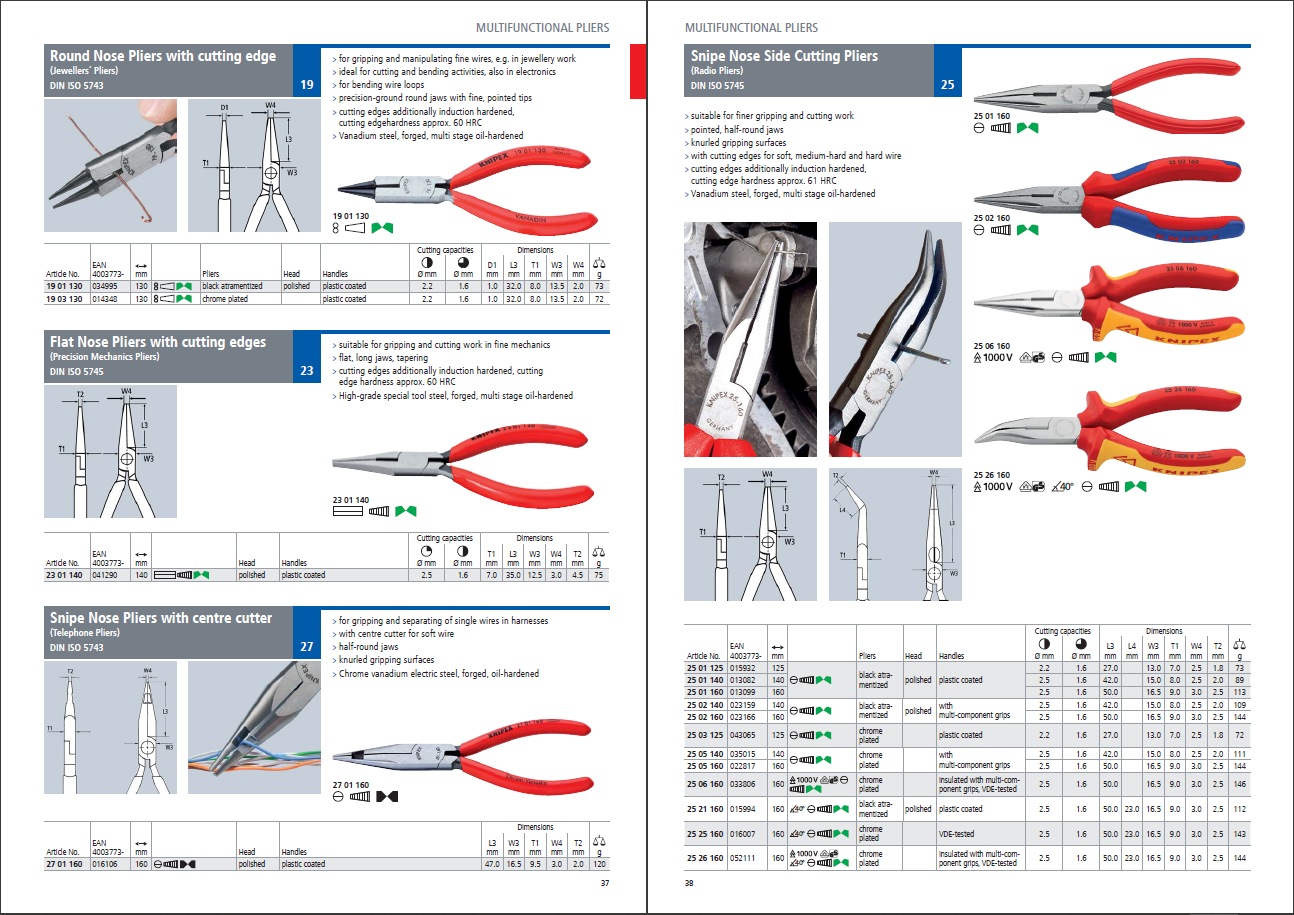
Descriptions: short, benefit-focused, and easy to scan.
Pricing and SKUs: accurate, clearly displayed, and easy to compare.
Calls-to-Action: guide customers toward purchase or inquiry.
Brand consistency: your logo, colors, and typography should always be present to reinforce identity.
To increase interaction, you can add QR codes that link directly to product pages on your website, making it simple for customers to buy or learn more. Another option is to integrate digital order forms, streamlining the purchasing process and reducing friction.
The way you design product pages also depends on your industry:
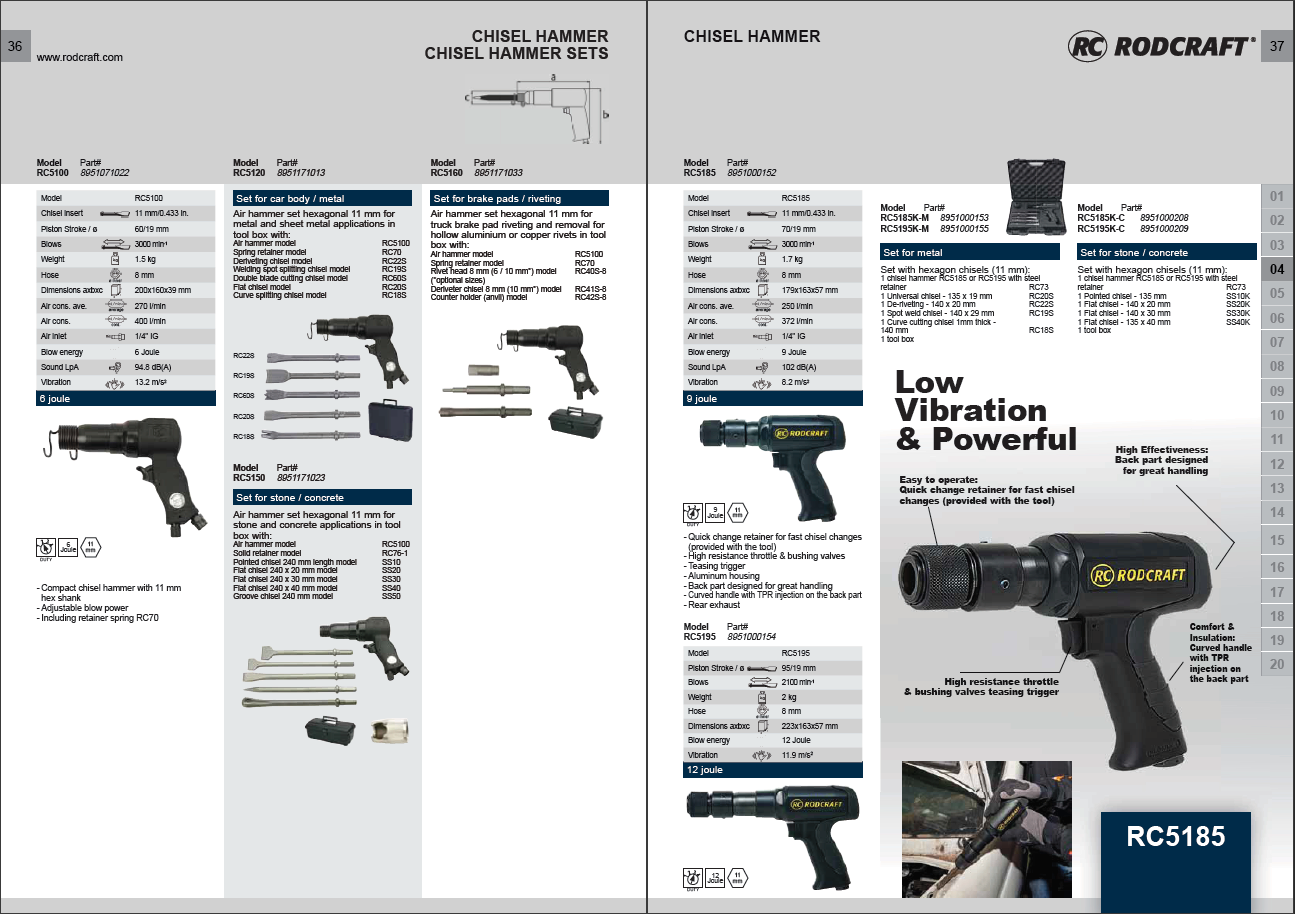
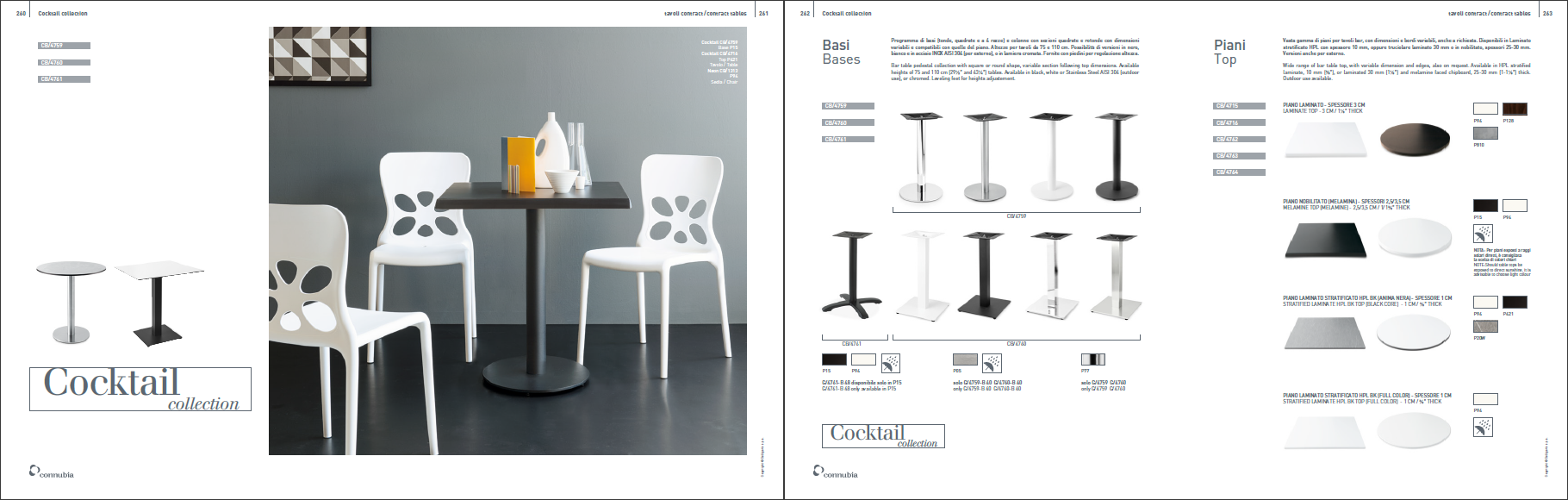
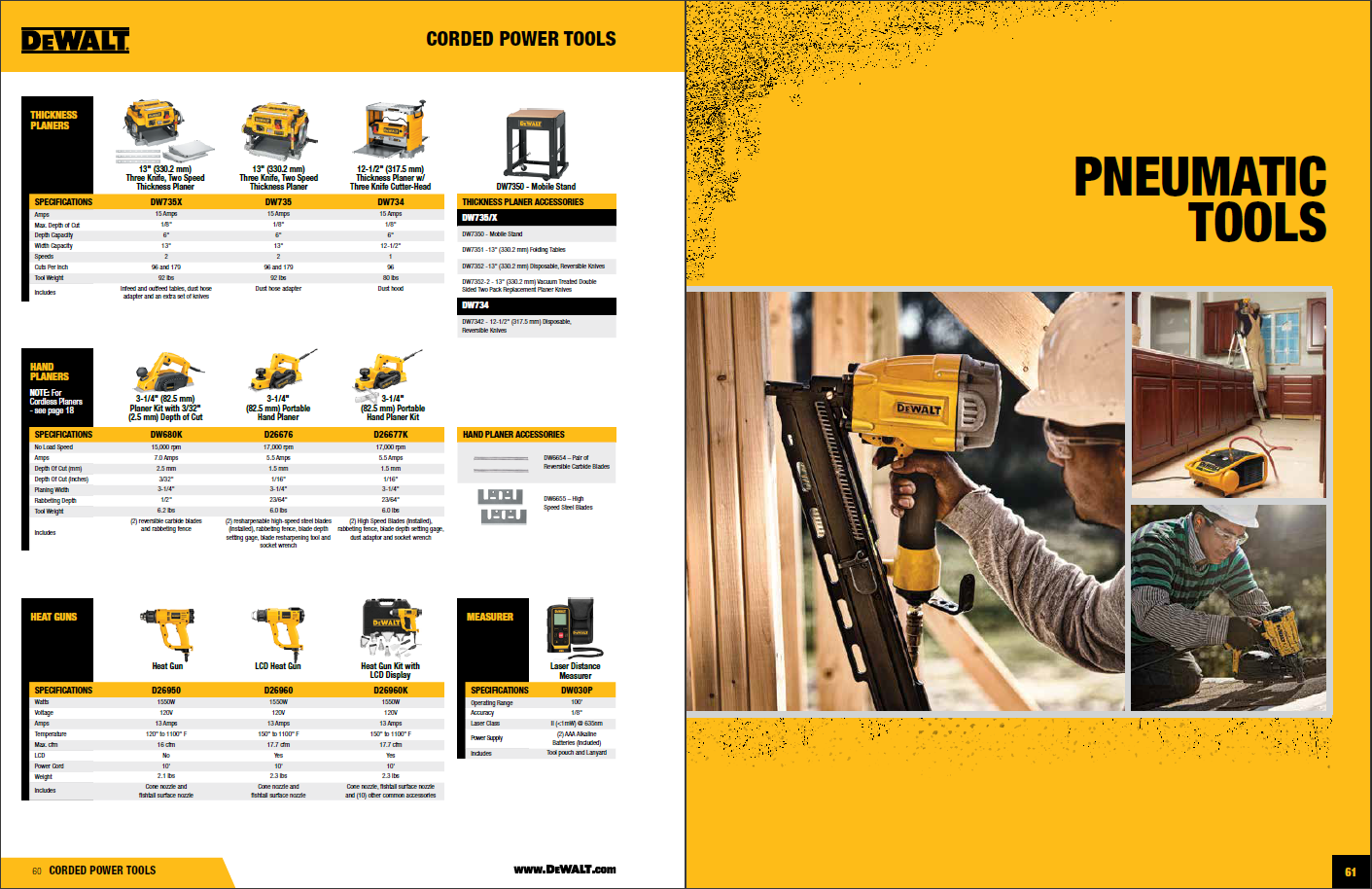
For design and furniture companies like Gubi, layouts should emphasize aesthetics, large visuals, and the emotional impact of the products.
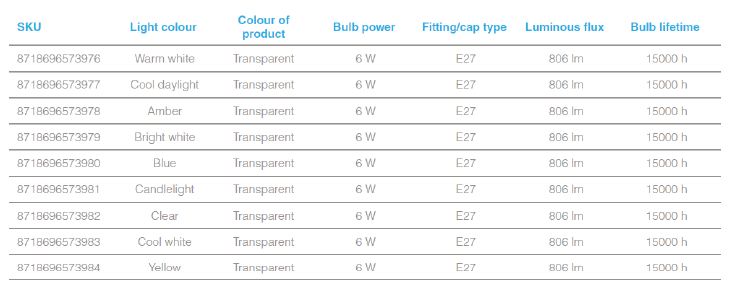
For wholesalers or technical industries like Fricke, clarity, detailed specifications, and efficient navigation are more important than visual storytelling.
In both cases, the goal is the same: make the catalog easy to browse, visually appealing, and effective in driving sales.
Special sections
Besides the classic product pages, a catalog can also include additional layouts that make navigation easier and highlight key products or promotions. These sections enrich the browsing experience and can boost sales:
Category Dividers / Chapter Openers: large images, bold headlines, and short text to introduce different product categories. They help readers understand the structure at a glance and move smoothly from one section to another.
Special Promotions or Seasonal Highlights: dedicated pages for time-limited offers, bundles, or seasonal collections. Perfect to create urgency and keep the catalog dynamic.
New Arrivals / Featured Products: a section to showcase the latest launches or most strategic products, usually placed at the beginning to attract immediate attention.
Best Sellers / Customer Favorites: highlighting popular products adds social proof and guides new customers toward trusted choices.
Order forms: to facilitate product ordering, you can add fillable PDF forms that customers can fill out digitally to place their orders.
These extra layouts are not mandatory, but they can transform a simple product catalog into a richer, more engaging tool that works both as a sales driver and a brand statement.
Back cover
The back cover may seem secondary, but it’s a strategic touchpoint. Keep it simple and use it for:
Website link and social media handles.
Customer service details (email, phone, address).
QR codes to drive traffic online.
Think of the back cover as the last impression you leave: a practical, clear way for readers to get in touch or continue the journey online.
When producing or presenting digital catalogs, system performance can greatly influence your workflow. Large image files, design software, and data-heavy templates can slow down your computer, affecting efficiency and precision. Using tools like CleanMyMac helps keep your device optimized and running smoothly, ensuring that catalog design, editing, and export processes remain fast and error-free.
Product catalog examples from different industries
A catalog can take many forms depending on the industry, the size of the product range, and the target audience. To make it concrete, here are a few real-world examples from companies that partnered withPagination:
Pierre Frey: luxury home textiles Pierre Frey produces high-end catalogs that showcase fabrics, wallpapers, and furniture with a strong focus on visual identity. The challenge was to automate catalog production without losing design precision.
M&P O’Sullivan: wholesale and foodservice This Irish wholesale distributor needed to produce accurate, frequently updated price lists and promotional catalogs. Automation allowed them to speed up production while maintaining accuracy and consistency.
Therma-Tru: doors and building Materials Therma-Tru faced the challenge of creating a 5,000-page catalog with complex product variations. With Pagination, they managed to automate the process and deliver the entire project in record time.
ResinTech: technical product sheets ResinTech needed to generate hundreds of technical product sheets daily, each with detailed specifications and compliance data. With Pagination, they automated the process, ensuring accuracy and scalability without sacrificing design quality.
These catalog examples show how catalogs can be very different: from luxury lookbooks to wholesale price lists, massive technical catalogs, and even daily product sheets. The common thread? Each one becomes more efficient, accurate, and scalable with automation.
Let’s dig into how to achieve these results.
How to make your own catalogue?
Creating a catalog may sound like a big project, but breaking it down into steps makes the process manageable and effective for all the team. Here’s a clear roadmap:
Step 1: define the purpose and target audience
Every catalog starts with a goal. Is it meant to drive sales, support your sales reps, or build brand awareness?
Sales: Highlight best-sellers, emphasize features and benefits, and make the buying process simple.
Marketing: Use storytelling, lifestyle photography, and branding to build recognition and inspire.
Education: Provide detailed specifications, instructions, or technical data to inform decisions.
Being clear on the purpose ensures every choice, from design to wording, works toward the same objective.
Step 2: choose the catalog format
A catalog is always created digitally, but, as mentioned before, the final product can be:
Print: tangible, long-lasting, always available on a desk or showroom table. Research even shows paper beats digital in recall and emotional impact.
PDF: easy to email, host online, and share with customers.
Online/Interactive: flipbooks or embedded catalogs with clickable navigation, multimedia, and links.
Your choice depends on your audience, distribution method, and budget. Many businesses use a combination of formats for maximum reach.
Step 3: collect product information
Without accurate data, even the best design fails. Gather everything you need:
Images: High-quality photos (200–300 dpi for print). Avoid reusing low-resolution web images.
Other elements: logos, icons, certifications, barcodes.
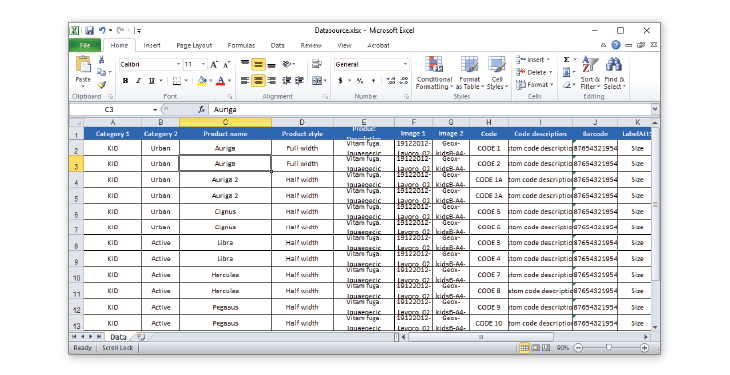
Typical sources include ERP systems (SAP, Oracle, Microsoft Dynamics), spreadsheets (Excel, CSV), XML or SQL databases, company websites, or past catalogs.
Step 4: organize and structure content
Think about how customers will browse: by category, price, or attribute?
For B2C catalogs, intuitive organization (new arrivals, seasonal picks) keeps browsing engaging.
A graphic designer, in-house or external, will typically create drafts using Adobe InDesign. The goal is a balance of readability, aesthetics, and brand consistency.
Step 6: assemble and finalize
Once all the elements are ready (data, images, texts) it’s time to merge data into the layout. This is the production phase, where your draft becomes the final document.
At this stage, you need to decide how to produce your catalog:
Manually, using traditional desktop publishing tools.
Automatically, through catalog automation software that connects your product data directly to the layout.
The choice between these two approaches depends on the size of your catalog, how often you update it, and the resources available. Let’s explore them better.
Manual vs. Automated catalog creation
When it comes to producing a catalog, knowing the steps is only half the story. The real decision is how you bring everything together. Some companies rely on traditional desktop publishing (DTP), where every detail is crafted by hand. Others turn to automated catalog software, which connects product data directly to design templates in the cloud.
Both approaches have their place, but the choice you make will impact speed, costs, accuracy, and scalability. Let’s take a closer look at how they compare.
Manual production (Desktop Publishing – DTP)
What Is desktop publishing (DTP) and how does it work?
Desktop Publishing is the traditional way of producing catalogs with design tools like Adobe InDesign, Canva, or Microsoft Publisher. Product data and images are inserted manually into the layout by a designer, who controls every detail of the catalog’s look and feel.
Why choose DTP for your catalog?
The key advantage is creative freedom. Every page can be designed from scratch, making it ideal when you need unique layouts, visual storytelling, or catalogs where aesthetics are not only the main priority, but they change often.
What are the limitations of DTP?
The drawback is that DTP is slow, manual, and prone to errors. Even small updates, like a price change, require going back into the layout and adjusting pages one by one. This makes the process expensive and inefficient when updates are frequent.
When is it most convenient to use DTP?
DTP works best for small catalogs, one-off projects, or companies with limited product ranges where flexibility and design experimentation matter more than speed or scalability.
Can you make a catalog in Word?
Yes, you can technically create a catalog in Microsoft Word using tables, text boxes, and images. However, Word is not designed for professional catalog production. It lacks advanced layout features, brand consistency tools, and automation options available in catalog design software or InDesign. As a result, Word catalogs are often time-consuming to build, harder to update, and less visually appealing.
If you need a simple, small document, Word can work. But for professional, scalable catalogs, dedicated catalog software or desktop publishing tools are a much better choice.
Automated Production (Database Publishing)
What is automated catalog software and how does it work?
Automated catalog production uses cloud-based catalog software that connects your product data directly to your layout templates. Known as database publishing, this method eliminates repetitive manual work by merging SKUs, descriptions, images, and prices with pre-set layouts and generating catalogs in minutes.
What are the benefits of catalog automation?
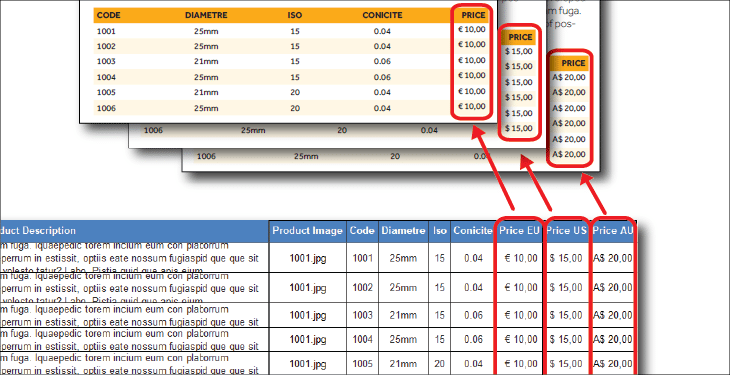
The advantages are clear: faster production, fewer errors, and consistent design. Catalog software also supports complex needs such as multilingual versions, multipricing, and multiple formats (print-ready PDFs, interactive PDFs, and InDesign files).
Another benefit is that you don’t need any graphic skill in order to obtain a professional catalog, since the whole process is handled by the system.
What are the challenges of automation?
The only real challenge is the initial setup. Your data needs to be structured and your template well-prepared, but you are assisted by a professional team. Once this foundation is in place, however, updates and new editions become almost effortless.
Who should use catalog automation?
Automation is ideal for businesses with large catalogs, frequent updates, or multiple market and language versions. These companies gain the most from faster workflows and improved accuracy.
Make a catalog with Pagination
Pagination’s catalog software is a cloud-based solution that merges your product data with InDesign templates. The process is simple:
Upload or connect your product data (Excel, CSV, ERP, PIM, XML, SQL, etc.).
Pagination automatically merges data into your catalog template.
Generate professional catalogs in PDF and InDesign, ready for print or digital distribution in just minutes.
This approach not only saves time but also ensures professional design, consistent branding, and scalability as your catalog grows.
Every project built with Pagination starts from the customer’s needs. Our team carefully analyzes your requests and existing documents to design an automated workflow that mirrors the way you already work, but faster, more accurate, and easier to scale. While every solution is customized, there are a number of core features that most of our clients rely on:
Cloud-Based and always accessible
Pagination runs entirely in the cloud, so there’s no need to install or maintain software. Catalogs can be generated anytime, anywhere, and shared instantly with your team or customers.
Direct data integration
Whether your product information lives in Excel, CSV, ERP, PIM, XML, or SQL, Pagination connects to your data source via custom integrations. Updates flow into your catalog automatically, eliminating repetitive copy-paste work and reducing the risk of errors.
Professional InDesign templates
Your brand identity is never compromised. Pagination uses your custom InDesign templates, ensuring every catalog reflects your typography, colors, and layout rules across all versions.
Multi-version and multilingual support
If you manage different markets, currencies, or languages, Pagination automates all variations within a single workflow. No more manual duplication or reformatting: every version is generated consistently.
Output in PDF and InDesign
In just minutes, you can produce both print-ready PDFs and fully editable InDesign files. This gives you the speed of automation with the flexibility to make manual adjustments when needed.
Scalability for large catalogs
Whether you’re publishing 50 pages or 5,000, Pagination handles catalogs of any size with the same speed and reliability. Even the most complex, SKU-heavy documents can be generated automatically without slowing down your workflow.
Creating a professional catalog is not just about design: it’s also an investment. The final cost depends on several factors: the complexity of your products, the number of pages, and whether you choose manual design or automation.
Design and layout costs
For a traditional graphic design project, it’s hard to spend less than €2,000 for the initial setup. Then, expect between €20 and €45 per page for layout and pagination.
A 300-page catalog created manually can easily reach €10,000–12,000.
If your catalog includes complex references, like modular furniture with technical charts, finishes, or multiple variations, the cost per page can climb even higher.
How automation reduces costs
With a cloud-based catalog automation system, costs drop significantly. A complete editorial project can range from €2,000 to €8,000, depending on the complexity, but once the workflow is set up, updates and new editions cost a fraction of manual design. Instead of paying per page, you pay for the system, which then generates hundreds or thousands of pages in minutes. For companies that publish frequently, the savings are considerable.
Printing costs
Once the design is ready, printing introduces another cost variable. Prices depend on the number of copies, page count, paper quality, and binding type. Here are two real-world examples:
Example 1: 300-page softcover catalog (A4, 130gr paper, 250gr cover)
100 copies → €1,100 total (€11 per copy)
1,000 copies → €5,300 total (€5.30 per copy)
10,000 copies → €28,000 total (€2.80 per copy)
Example 2: 800-page hardcover catalog (A4, 115gr paper)
500 copies → €13,200 total (€26.40 per copy)
5,000 copies → €43,000 total (€8.60 per copy)
10,000 copies → €76,000 total (€7.60 per copy)
Why choosing the right printer matters
Printing is the last line of defense before your catalog reaches customers. A reliable printer helps you manage details like ink drying times, binding, or paper handling, which can make the difference between a polished final product and costly reprints. Cutting corners here often leads to surprises you don’t want.
Key takeaways: how to make a catalog successfully
Define your purpose and audience: Decide whether your catalog is for sales, marketing, or education.
Choose the right format: Print, PDF, or online catalogs each have their strengths.
Include all essential elements: Front cover, table of contents, introduction, content pages, category dividers, promotions, and back cover.
Collect and structure your data: Accurate SKUs, prices, and descriptions are the backbone of any catalog.
Decide on manual vs. automated production: Manual DTP offers flexibility but is costly; automation with catalog software ensures speed, accuracy, and scalability.
Mind the costs: Manual catalogs can reach €10,000+ for large projects, while automation reduces costs and accelerates updates.
Don’t overlook printing: Paper quality, binding, and volume all impact the final budget and impression.
Automation is the future: For large, multilingual, or frequently updated catalogs, automation saves time and improves consistency.
By following these steps, you’ll know not just how to make a catalog for your business, but how to make one that truly drives sales and enhances your brand.
Conclusion
Creating a catalog is about designing a structured, branded document that communicates your value, guides purchasing decisions, and strengthens customer relationships. Whether you choose a small printed catalog, a digital PDF, or a multilingual database-driven catalog, the goal remains the same: making your products easy to find, understand, and buy.
While manual design tools like InDesign or Word can work for small projects, businesses with larger, frequently updated catalogs save time and money with automation. With Pagination’s cloud-based catalog software, you can produce professional, on-brand catalogs in minutes, ready for both print and digital use.
To provide the best experiences, we use technologies like cookies to store and/or access device information. Consenting to these technologies will allow us to process data such as browsing behavior or unique IDs on this site. Not consenting or withdrawing consent, may adversely affect certain features and functions.
Functional
Always active
The technical storage or access is strictly necessary for the legitimate purpose of enabling the use of a specific service explicitly requested by the subscriber or user, or for the sole purpose of carrying out the transmission of a communication over an electronic communications network.
Preferences
The technical storage or access is necessary for the legitimate purpose of storing preferences that are not requested by the subscriber or user.
Statistics
The technical storage or access that is used exclusively for statistical purposes.The technical storage or access that is used exclusively for anonymous statistical purposes. Without a subpoena, voluntary compliance on the part of your Internet Service Provider, or additional records from a third party, information stored or retrieved for this purpose alone cannot usually be used to identify you.
Marketing
The technical storage or access is required to create user profiles to send advertising, or to track the user on a website or across several websites for similar marketing purposes.